Most job applicants copy a private‑sector CV template. That’s a mistake. Government recruiters look for different information – and they reject CVs that are hard to scan or missing key details.
Before you read the explanations, use the tool below to check your current CV. It takes 30 seconds. Tick the sections you already have. The tool will give you a score and tell you what’s missing.
CV Readiness Score – Check Your CV
Tick the sections you have already included in your CV. The tool will calculate your score and tell you what’s missing.
📊 CV Readiness Score – Check Your CV
Tick the sections you have already included in your CV. The tool will calculate your score and tell you what’s missing.
Your CV readiness score: 0%
What Happens When a Government Recruiter Opens Your CV
A friend who works in a district HR office told me: “We get 500 CVs for a single clerical post. I spend 20 seconds on each CV. If I can’t find the CNIC number and domicile in the first glance, I move on.”
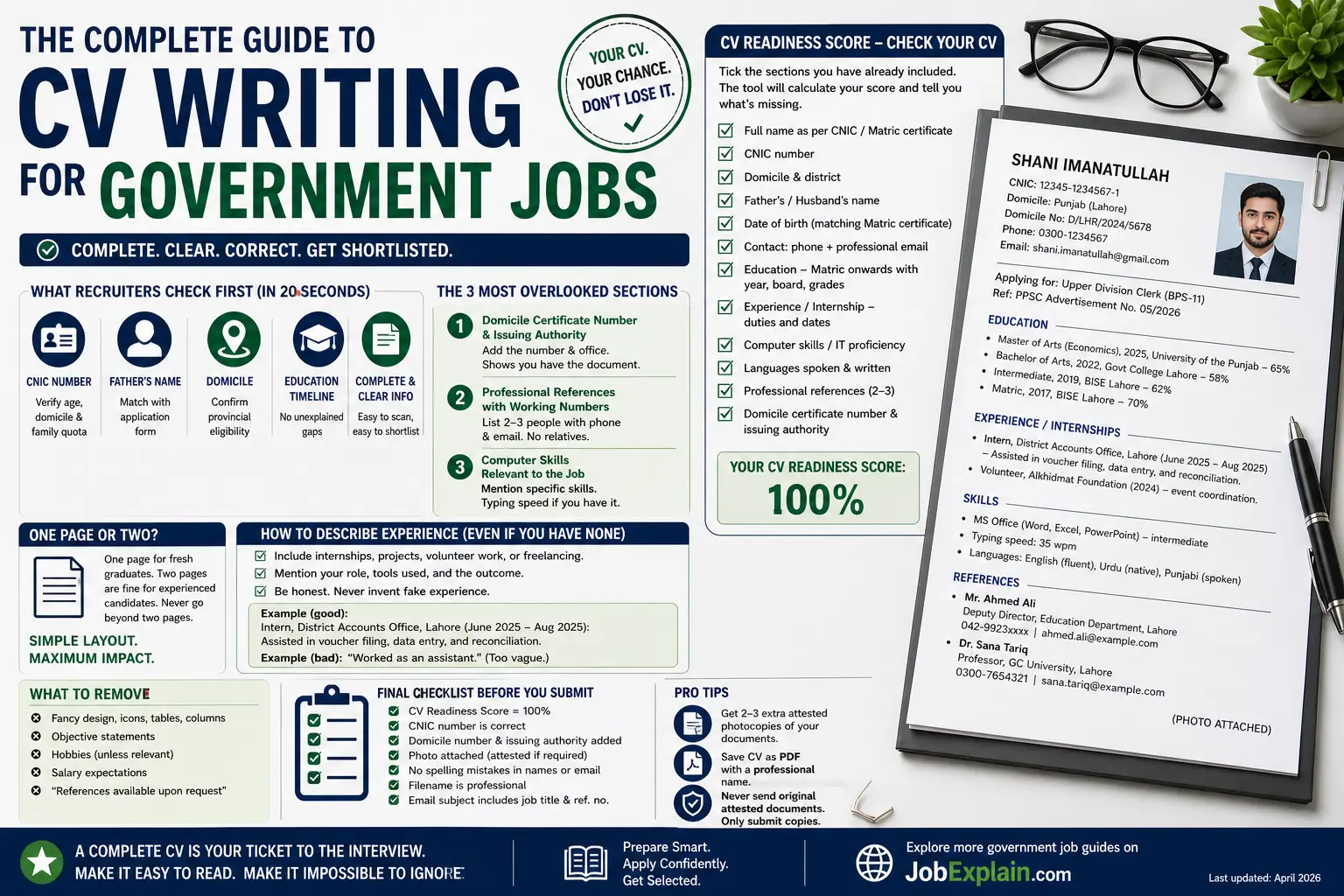
That’s the reality. Government recruiters are not impressed by fancy fonts or coloured headings. They are looking for specific data points in a predictable order. Here’s what they check first:
- CNIC number – to verify age, domicile, and sometimes family quota.
- Father’s name – to match with the application form.
- Domicile – to confirm provincial eligibility.
- Education timeline – no unexplained gaps.
If any of these are missing or hard to find, your CV goes to the “reject” pile, even if you are the most qualified person.
The 3 Most Overlooked Sections (Add Them Today)
Most candidates include name, contact, education, and experience. But they forget these three – and they cost you points in the tool above.
1. Domicile Certificate Number & Issuing Authority
Many applicants assume that writing “Domicile: Punjab” is enough. But adding the actual certificate number and the office that issued it (e.g., *“Domicile No: D/LHR/2024/5678, issued by DC Lahore”*) signals that you have the official document ready. Recruiters notice this.
2. Professional References with Working Phone Numbers
“References available upon request” is useless. List 2‑3 people (former employer, professor, or a government officer) with their designation, department, phone number, and email. Do not list relatives – recruiters will call and verify. A fake reference will disqualify you permanently.
3. Computer Skills Relevant to the Job
If the job involves data entry, mention “Typing speed 35 wpm” or “MS Excel – pivot tables”. If the job is for a clerk, “MS Word, Excel, email management” is enough. Do not list “Internet browsing” – that’s expected.
One Page or Two? The Right Answer
Private‑sector advice says “one page”. For government jobs, two pages are fine – as long as every line adds value. A fresh graduate with no experience can fit everything on one page. A candidate with 10 years of experience may need two pages. Never go beyond two pages.
The layout must be single column, black text on white, 11‑12pt font. No columns, no graphics, no photos embedded in the text (photo is attached separately if required). Use bold for headings only.
How to Describe Experience (Even If You Have None)
If you have no formal work experience, do not leave the section blank. Instead, add:
- Internships (even 2‑week unpaid)
- Final year project (describe your role, tools used, outcome)
- Volunteer work (e.g., helped at a charity, organised a university event)
- Freelancing (if relevant to the job)
Be honest. If you truly have nothing, write “No work experience yet” and focus on your education and skills. Never invent fake jobs – government background checks are thorough.
Example (good):
“Intern, District Accounts Office, Lahore (June 2025 – Aug 2025): Assisted in voucher filing, data entry, and reconciliation of monthly expenditure reports.”
Example (bad):
“Worked as an assistant.” (Too vague.)
The Photo Rule – Don’t Ignore It
If the job advertisement says “attested photograph”, you must:
- Paste a physical, recent passport‑size photo (blue or white background, formal dress).
- Have it attested by a Grade‑17 or above government officer (or a notary, as per the ad). The officer signs across the edge of the photo and the paper.
- Do not staple across the face – staple only at the top or side.
If the ad does not mention an attested photo, still attach a clear, scanned photo (if applying online) or glue a physical one (if offline). A missing photo is a common reason for rejection.
CV Template – Simple, Plain, Effective
You don’t need to buy a template. Copy this structure into Word:
text
[Your Full Name]
CNIC: 12345-1234567-1 | Domicile: Punjab (Lahore) | Domicile No: D/LHR/2024/5678
Phone: 0300-1234567 | Email: yourname@example.com

Applying for: [Job title] – Ref: [ad reference number, if any]

EDUCATION
• Master of Arts (Economics), 2025, University of the Punjab – 65%
• Bachelor of Arts, 2022, Govt College Lahore – 58%
• Intermediate, 2019, BISE Lahore – 62%
• Matric, 2017, BISE Lahore – 70%

EXPERIENCE / INTERNSHIPS
• Intern, District Accounts Office, Lahore (June 2025 – Aug 2025)
  – Assisted in voucher filing, data entry, and reconciliation.
• Volunteer, Alkhidmat Foundation (2024) – event coordination.

SKILLS
• MS Office (Word, Excel, PowerPoint) – intermediate
• Typing speed: 35 wpm
• Languages: English (fluent), Urdu (native), Punjabi (spoken)

REFERENCES
• Mr. Ahmed Ali, Deputy Director, Education Department, Lahore – 042-9923xxxx – ahmed.ali@example.com
• Dr. Sana Tariq, Professor, GC University – 0300-7654321

(PHOTO attached)
Fill in your own details. Save as PDF with a professional name: Shani_Imanatullah_CV_Clerk.pdf. Do not use CV_final_2_updated.pdf.
What to Remove from Your Private‑Sector CV
- Fancy icons, tables, columns – they break when printed.
- Objective statement like “Seeking a challenging role…” – replace with “Applying for [position]” line.
- Hobbies (unless directly relevant, like “blogging” for a content role).
- Salary expectations – never mention them; discuss at interview.
- References written as “Available upon request” – either list them or omit the line.
Final Checklist Before You Submit
Run this quick check:
- CV Readiness Score = 100% (all 12 sections ticked in the tool).
- CNIC number is correct (no missing digits).
- Domicile number is added (with issuing authority).
- Photo is attached (attested if required).
- No spelling mistakes in your name, father’s name, or email.
- Filename is professional (not “CV_2026_final”).
- If applying by email, the subject line includes the job title and reference number.
What to Do If Your Score Is Below 70%
The tool gave you a low score. Don’t panic. Open your CV right now and add the missing sections – start with CNIC, domicile, education, and contact info. Those are non‑negotiable. Then gradually add the rest. Once you reach 100%, your CV will be in the top 20% of applications.
Success Story – How a Reader Got Shortlisted After Using This Guide
Last month, a reader named Bilal from Faisalabad sent me a thank‑you email. He had applied for 12 government jobs over two years and never got shortlisted. He used the checklist in this article (the older version) and added his domicile number and proper references. His next application – for a BPS‑14 post in the irrigation department – got shortlisted. He didn’t get the final job, but he said: “For the first time, my CV was actually opened and read.”
That’s the difference. You don’t need to be the most qualified. You need to be complete and easy to evaluate.
Next Step
Now that your CV is ready, move to the next guide in this series: Understanding Government Pay Scales (BPS 1‑22) – where you will learn how to calculate your exact salary.
🔗 Explore more government job resources on JobExplain.com
Last updated: April 2026
Disclaimer: Requirements vary by department and job advertisement. Always read the official ad. This guide is based on common patterns and experiences, not an official document.